Twitter/X Follower Analytics Report
Enter any X/Twitter username to get started. We download their followers and generate a full analytics report with bot detection, audience interests, lead scores, and AI-powered insights.
One-time payment. We collect follower data and generate the analytics report automatically.
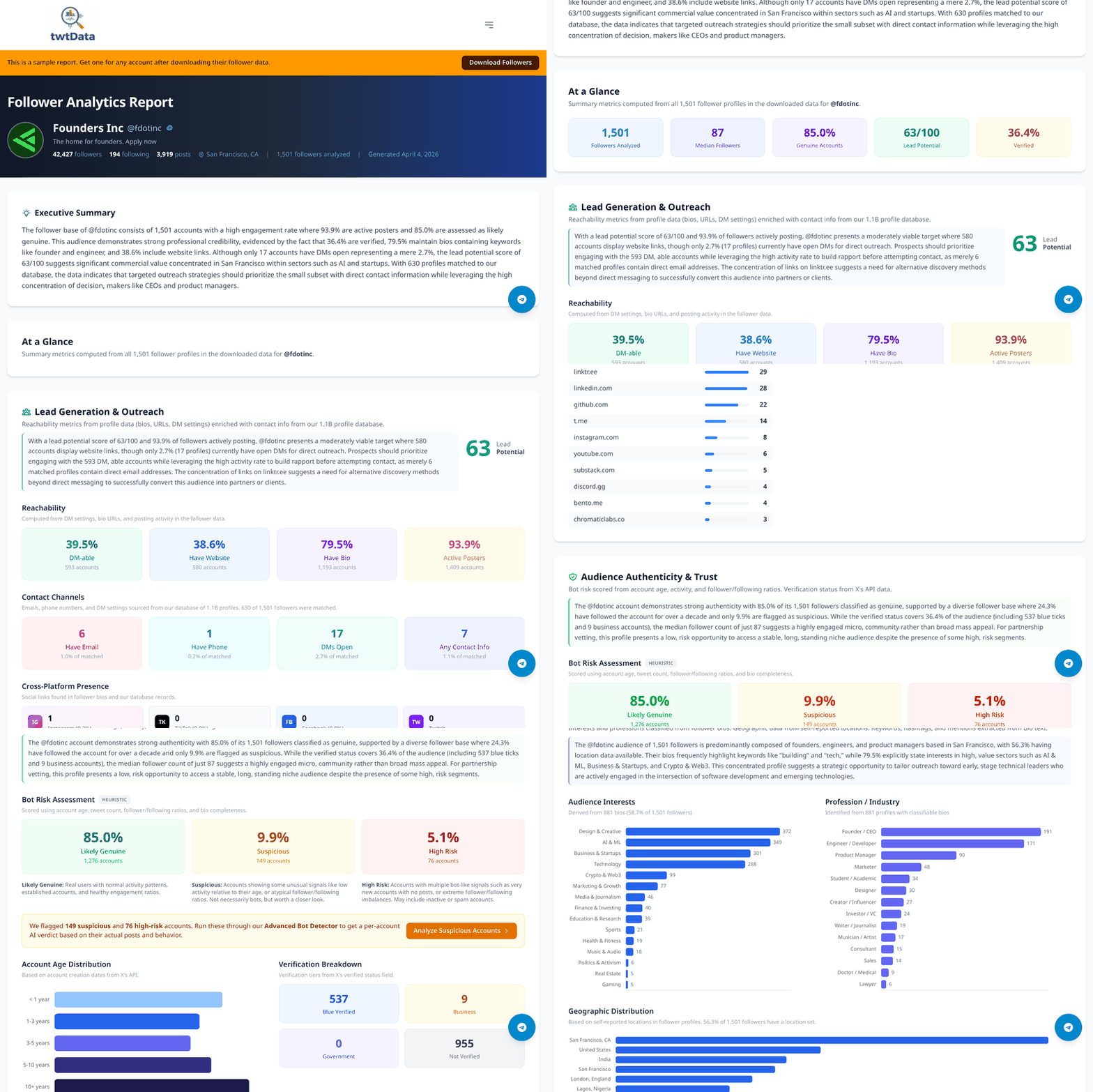
See a real follower analytics report
Explore a full analytics report generated for a public account.
Follower analytics report pricing
One-time payment per report. No subscriptions.
Under 10K followers
$4.99
Most accounts
10K+ followers
$14.99
Large audiences
Requires a follower/following data download (from $5.99).
What is included in the report
Nine sections of data, analysis, and AI-powered insights generated from your follower data.
Lead Generation & Outreach
Find followers with open DMs, emails, websites, and cross-platform presence. See who you can actually reach.
Audience Authenticity
ML-powered bot detection with per-account confidence scores. Know exactly what percentage of your audience is real.
Interests & Professions
See what your followers care about and what they do for a living, classified from bios using NLP.
Network Composition
Influence tiers, account types, activity levels. Understand the shape and strength of your audience.
Notable Followers
Your most influential followers ranked by reach, with direct links to their profiles.
Trends & News
Recent news mentions and trend analysis for the account, so you can see what the public conversation looks like.
AI Executive Summary
A plain-English narrative of your audience written by AI, plus section-by-section analysis.
Key Takeaways
Eight auto-generated insights distilled from your data. The most important things to know at a glance.
PDF Export
Download the full report as a polished PDF, ready to share with clients, stakeholders, or your team.
Frequently Asked Questions
X's built-in analytics (at x.com/i/account_analytics) shows basic metrics like impressions and follower count, but it requires an X Premium subscription and only covers your own account. To get detailed follower-level analytics (who your followers are, what industries they work in, whether they are real or bots) you need to export the data and run a deeper analysis. twtData's Follower Analytics Report does this automatically: enter a username and we generate a full breakdown of the audience with bot detection, interests, professions, lead scores, and more.
Yes. Unlike X's native analytics, which only lets you see data for your own account, twtData lets you analyze the followers of any public X/Twitter account. This is useful for competitor research, influencer vetting, and understanding a target audience before a partnership or ad campaign. Just enter any username and we will pull the follower data and generate an analytics report.
X does not offer any built-in bot detection. Common manual signals include accounts with no profile picture, empty bios, very high following-to-follower ratios, and no recent tweets. However, manually checking thousands of followers is not practical. twtData's analytics report uses machine learning to score every follower for bot risk based on multiple profile signals (account age, activity patterns, follower ratios, and bio content), giving you a clear count of suspicious and high-risk accounts along with an overall audience authenticity percentage. For advanced per-account verdicts with evidence, try our Bot Detector tool.
No. X does not provide any way to see who specifically views your profile, and no legitimate third-party tool can do this either because the API does not expose that data. X Premium shows you a total profile visits count, but not individual viewers. What you can do is analyze who follows you, who has open DMs, and who actively engages with your content. twtData's Follower Analytics Report surfaces your most notable followers and identifies those with contact channels (DMs, emails, websites) so you know who your most reachable audience members are.
X's built-in analytics used to be free but now requires an X Premium subscription (starting at $8/month). Even with Premium, you only get aggregate numbers for your own account with no per-follower details, no bot detection, and no ability to analyze other accounts. twtData provides detailed follower-level analytics on any public account starting at $4.99 as a one-time report with no recurring subscription. You can view a free sample report to see exactly what is included before purchasing.
If you have X Premium, go to x.com/i/account_analytics on desktop. You will see a 28-day overview of impressions, engagement rate, profile visits, and follower count. On mobile, you can tap the bar chart icon on any of your posts to see per-post stats. However, X's native dashboard only shows your own account's data and does not break down who your followers are. For audience-level analytics (demographics, interests, professions, bot detection) across any account, twtData's Follower Analytics Report fills that gap.
twtData's report covers nine sections: lead generation and outreach channels (DMs, emails, websites), audience authenticity with per-account bot risk scores, audience interests and professions classified from bios using NLP, network composition (influence tiers, account types, activity levels), notable followers ranked by reach, trends and news mentions for the account, an AI executive summary, key takeaways, and a downloadable PDF export. Every section includes interactive charts and data tables. See the full sample report to explore each section.
It depends on what you need. For basic engagement metrics on your own posts, X's built-in dashboard (with X Premium) is sufficient. For scheduling and multi-platform reporting, tools like Hootsuite or Buffer work well. For deep follower-level analysis (who your followers are individually, bot detection, profession classification, lead generation from bios, and audience composition) twtData's Follower Analytics Report is purpose-built for this. It works on any public account, not just your own, and produces a one-time report with no ongoing subscription.
For X's native analytics dashboard, yes. It now requires X Premium ($8+/month). But even with Premium, you only see aggregate stats (total follower count, daily follow/unfollow numbers) and only for your own account. You cannot see individual follower details, detect bots, or analyze someone else's audience. twtData does not require X Premium. You provide a username, we pull the data via the Twitter API and generate a detailed per-follower analytics report for a one-time fee starting at $4.99.
Start by looking at surface metrics: follower count, engagement on recent posts, and the ratio of followers to following. But for real insight, especially before signing an influencer deal, vetting a partnership, or understanding a competitor's audience, you need follower-level data. Download the full follower list as CSV and add a Follower Analytics Report covering audience authenticity (what percentage are bots), audience interests and professions, geographic distribution, notable followers, and lead generation channels. The report includes an AI-written executive summary and is exportable as a PDF for stakeholder review.